HyprBSD: FreeBSD with Hyprland that runs Steam games
Published on · Updated on
The distribution ships FreeBSD 15.1 with a preconfigured Hyprland desktop and uses the system's binary compatibility layer to install Steam and run PC games.
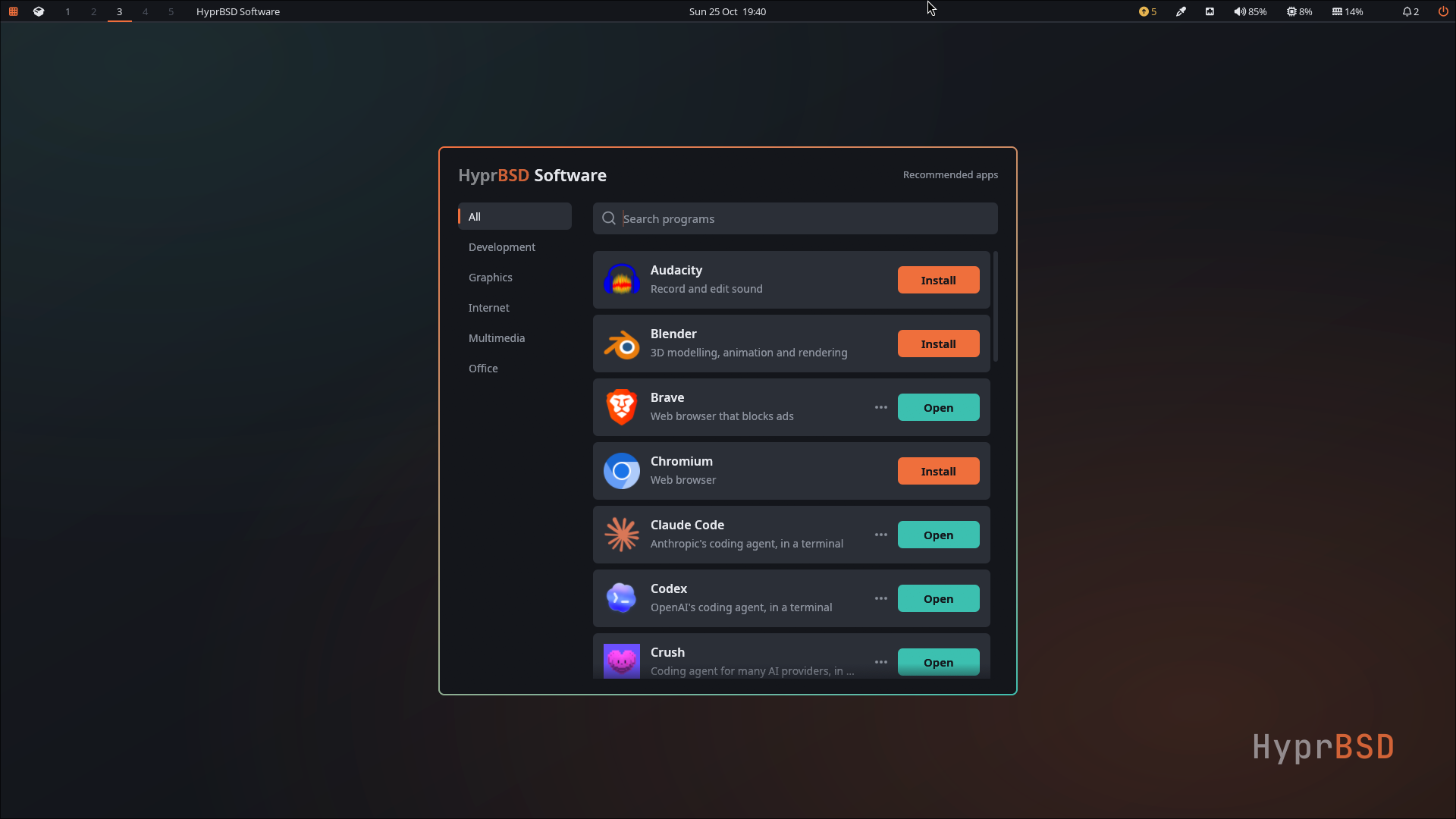
HyprBSD is a distribution that packages FreeBSD 15.1-RELEASE with a preconfigured Hyprland desktop and a binary compatibility layer that lets users install the Steam client and run PC games. Its first stable release shipped on 16 November 2026 as a 3.7 GB ISO for amd64 machines with UEFI, and the project is maintained by developer Sam Sheridan with sponsorship from Sheridan Computers. The goal is to remove the friction that has long kept users away from FreeBSD on graphical workstations: instead of assembling drivers, an audio server, a Wayland session and compatibility libraries by hand, the user writes the image to a USB stick, installs, and finds a working desktop — without giving up FreeBSD's own kernel and base system.
What HyprBSD is — and why it exists
HyprBSD is not a new operating system. It is FreeBSD 15.1-RELEASE, with the kernel and base system taken from the FreeBSD Project's own packages, plus a custom installer and a set of desktop tools. The installer asks about keyboard, time zone, network, user account, target disk and encryption, and picks the right graphics driver for the machine — including NVIDIA kernel modules built for release 15.1, which is exactly where the story started.
Installation works without a network connection: the ISO already carries the base system, the drivers and the desktop packages. The installed system uses UEFI, even though the image can boot through BIOS, and the installer offers disk encryption on ZFS. From this release onward, the SHA256 checksum file is also signed with the project's release key, so users can verify not only that the download arrived intact, but that the hash really came from the maintainers.
| Base system | FreeBSD 15.1-RELEASE (official kernel and base) |
|---|---|
| Architecture | amd64 |
| Desktop | Hyprland on Wayland |
| Installed-system boot | UEFI |
| Image | hyprbsd-15.1-RELEASE.iso, 3.7 GB |
| Published | 16 November 2026 |
| Licence | BSD-2-Clause |
| Development | Sam Sheridan, sponsored by Sheridan Computers |
The project's origin is documented by its author. On 26 September 2026, Sheridan spent ten hours trying to get an NVIDIA driver working on a clean FreeBSD 15.1 install and wrote about it on LinkedIn. Jordan Hubbard, one of FreeBSD's co-founders, replied to the post:
“Half of my brain wants to reply ‘you’re right, it should just work out of the box and someone should try to figure out how to do that, then get it into a release!’ The other half told me to bang on it until it works.”
Seven weeks later, the result is an installation ISO with a ready desktop. “Seven weeks of banging on it later, here’s the release,” Sheridan wrote in the stable release announcement — a line that sums up both the method and the scope of the work.
Hyprland and Wayland: what changes on FreeBSD
Hyprland is a Wayland compositor with dynamic tiling, Bézier-based animations and rounded corners. On Linux distributions it usually depends on components tied to systemd, such as logind, to manage seats and session permissions. On FreeBSD that role falls to alternatives such as seatd, while graphics acceleration goes through the drm-kmod kernel module, which brings the Linux DRM and KMS subsystems to AMD and Intel cards, with the Mesa stack and Vulkan support on top.
HyprBSD does not maintain a full fork of the compositor. The current version uses Hyprland 0.57.2 from FreeBSD's ports with two patches of its own: one keeps the session alive through suspend and resume, the other avoids a crash when Hyprland exits. Waybar, the status bar used on the desktop, also moved to builds from the official ports, with three project fixes between the two components. It is a deliberate choice: the less software HyprBSD carries itself, the less maintenance it accumulates and the faster ecosystem fixes reach users.
In practice, the experience is that of a regular tiling desktop with documented shortcuts. Super + K opens the full keybinding list, Super + Enter opens a terminal, Super + E the file manager and Super + A the project's software store. There is clipboard history on Super + Ctrl + V, screenshot annotation from the notification, and window recording on Alt + Print.
Linuxulator: the layer that brings Steam to FreeBSD
Binary compatibility is the point that makes the proposal interesting for players. FreeBSD keeps Linuxulator, a module that intercepts Linux system calls and translates them, at runtime, into the equivalent calls of the FreeBSD kernel. The result is a Linux environment without a virtual machine or hypervisor: a /compat/linux directory populated with glibc libraries, audio subsystems and the runtimes needed to execute binaries compiled for Linux.
The Steam client for Linux is exactly that — a Linux binary. Running inside this layer, it talks to Valve's servers, downloads games and launches titles that also have a Linux build. For games that only exist for Windows, a second layer comes in: Wine, which HyprBSD Software configures before the first game. Diolinux's report, which first covered the project, also describes Proton and DXVK in that arrangement, translating Direct3D 9, 10, 11 and 12 calls into Vulkan commands executed by the host driver.
| 1. Kernel | FreeBSD 15.1-RELEASE kernel and base system, unmodified by third parties |
|---|---|
| 2. Linuxulator | Linux syscall translation in /compat/linux, with glibc and audio |
| 3. Steam client | Linux binary running inside the compatibility layer |
| 4. Wine or Proton | Layer for titles that only ship a Windows build |
| 5. DXVK and Vulkan | Direct3D translated to Vulkan and handed to the host driver |
| 6. Hyprland | Wayland compositor displaying the game window |
Audio and peripherals follow the same bridging principle. The system uses PipeWire with WirePlumber to route streams between native FreeBSD applications and Linuxulator binaries, while FreeBSD's evdev subsystem recognises USB controllers and gamepads and passes axes and buttons to the Steam client's input layer. The project itself adds a caveat: Steam works best under a dedicated user account, and game compatibility varies with the title and the driver.
HyprBSD Software: games in one click
Anyone who has tried FreeBSD as a desktop knows the next obstacle after installation: finding the exact package name. Brave, for instance, appears as linux-brave-browser because it is the Linux build running under compatibility. HyprBSD Software solves that with a program list organised by category — All, Development, Games, Graphics, Internet, Multimedia and Office — and an Install button for each item. Search looks at names, descriptions and categories.
The Games category holds Steam, EVE Online and four games from FreeBSD's own packages: 0 A.D., OpenTTD, SuperTuxKart and Xonotic. Installing or removing requires the password of a member of the wheel group, and the privilege session expires after a few minutes. Outside gaming, the list includes GIMP, Inkscape, Blender, OBS Studio, Kdenlive, DaVinci Resolve, LibreOffice, Thunderbird, Zed, Ghostty and even coding agents that run in a terminal.
There is one detail specific to NVIDIA cards. CUDA, NVENC and NVDEC exist only as Linux libraries, so OBS Studio could not use the GPU's video encoder on plain FreeBSD. On HyprBSD, when you log in on an NVIDIA machine, OBS, Firefox and mpv run through the hyprbsd nvidia-run command, which loads the Linux libraries into those processes. OBS can then record and stream with NVENC, and players decode video on the GPU.
Updates, security and the project's limitations
The most debatable — and best argued — decision in HyprBSD is not to maintain its own kernel or base system. Because the system really is FreeBSD 15.1, security fixes arrive through FreeBSD's pkg, without passing through the developer. On 17 November 2026, the FreeBSD Project published 21 security advisories affecting release 15.1, with fixes in 15.1-RELEASE-p7. One of them let an unprivileged user read kernel memory or crash the machine through the Linux compatibility layer — the very layer HyprBSD turns on for Steam and for browsers such as Brave.
To update, users click the update indicator, use the system menu or run hyprbsd update as root, then restart. Before changing anything, the routine saves a ZFS boot environment, so the previous system can be started from the boot menu if something breaks. The hyprbsd verify command checks every base-system file against FreeBSD's package checksums and lists where each package came from — a way for users to confirm the base really is the official one.
The price of that architecture showed on 7 November, when a FreeBSD package update broke the desktop of release candidate RC3. Since then, the project holds back any package that would break something, explains why, updates everything else, and tests each batch of packages in virtual machines installed from RC1, RC2 and RC3 before publishing it.
The limitations, however, are real and documented. Installation requires amd64 and UEFI; AMD cards are listed as untested, although the installer has a driver path for them; NVIDIA support depends on the bundled driver's device list. Wi-Fi varies by adapter, WPA3-only and enterprise 802.1X networks cannot yet be configured from the graphical app, and HyprBSD Disks is experimental. Multiboot USB tools have not been validated, minimum RAM and disk requirements have not been established, and most of the source code is not public — only Disks has been released, on GitHub, under the BSD 2-clause licence, with the rest promised for a Forgejo instance. The project also states it is not affiliated with the FreeBSD Project, the FreeBSD Foundation or Hyprland Development.
Is HyprBSD worth installing?
HyprBSD is less a “SteamOS for BSD” and more a FreeBSD desktop that finally takes on the work of being usable. For people who already use FreeBSD and want Wayland with Hyprland without editing dozens of configuration files, the proposal is directly appealing. For those who just want to play, the path remains rougher than on mature Linux distributions: compatibility depends on a chain of layers, the hardware must be on the tested list, and games with anti-cheat remain unpredictable ground.
The recommended test is the one the project suggests: a spare machine, a USB stick written directly from the image, and a backup of anything important. Anyone following the operating systems scene will find a serious experiment in how far FreeBSD's binary compatibility can go — and anyone watching the PC gaming market has a concrete reason to follow the evolution of Vulkan, NVIDIA and Steam support outside Linux.
The project's next steps are opening the source, widening the hardware matrix — starting with AMD cards — and keeping the update pace that turned a lost afternoon with a graphics driver into an installable distribution. The official page, with the ISO, signed checksums, release notes and installation guide, is at hyprbsd.org. This article is also available in Portuguese and Spanish.
Suggested and related articles
Clair Obscur: Expedition 33: Is It Worth Playing?

Stranger Than Heaven: release date and platforms

What is Chronicles: Medieval and why everyone wants to play

Guild Saga: Vanished Worlds hits PS5 in May 2027

Romancing SaGa 3: Destinies United moves up to Feb. 4