GTA 6: how to replay missions and which saves to keep
Published on · Updated on
GTA 6 has no mission replay menu: you can retry checkpoints mid-mission, but revisiting chapters depends on manual saves. See the step-by-step and the risks.
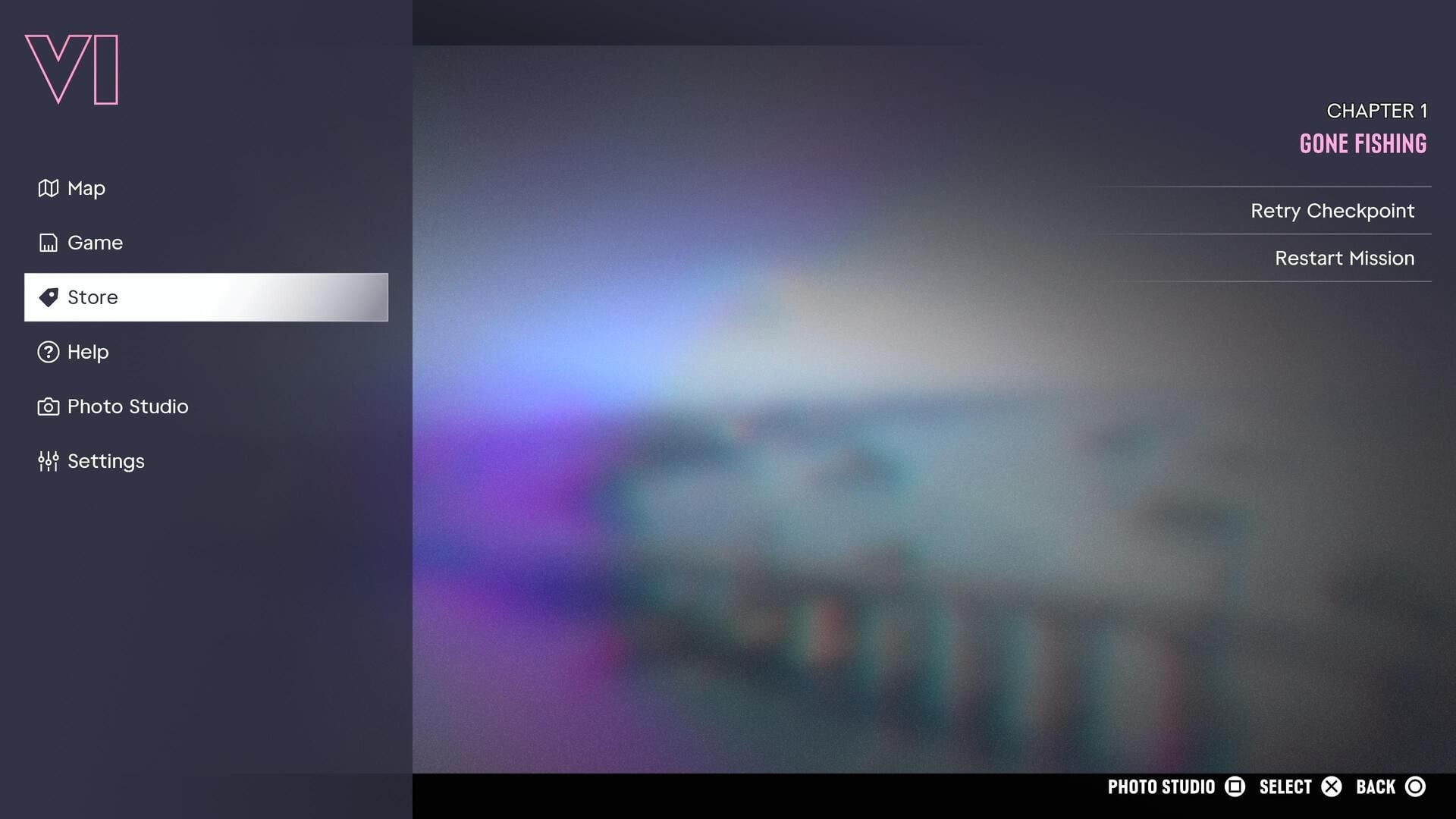
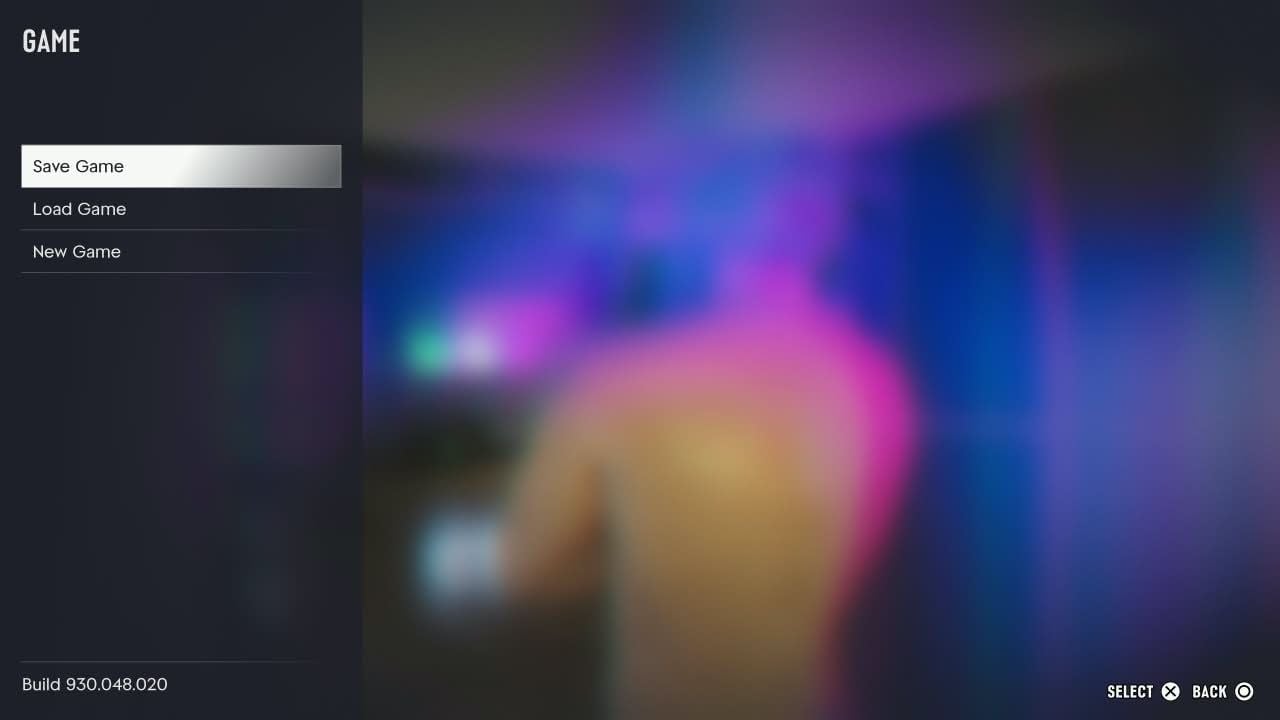
Grand Theft Auto 6 has no replay menu. Unlike GTA 5, which let players replay any completed mission through Pause > Game > Replay Mission, Rockstar's new game goes for a linear campaign: once a mission ends, it no longer appears in a list to be selected again. You can still repeat sections and revisit whole chapters — with Retry Checkpoint and Restart Mission while a mission is running, or by loading one of the 15 manual saves made before the point you want to see again. The path is Pause > Game > Save Game on PlayStation 5 and Xbox Series X|S. The catch is that a manual save rolls all progress back to the moment it was created, so planning where to save is part of the method.
The campaign has 93 main missions spread across five chapters and takes between 50 and 100 hours, depending on your pace. With that many missions and only 15 slots, replaying in GTA 6 becomes a planning exercise: players who never create manual checkpoints lose access to earlier moments as soon as the autosave moves on. This guide explains what works, what does not, and how to organize yourself so you never run out of ways back.
Does GTA 6 have a mission replay menu?
No. Rockstar did not include a screen for selecting completed missions, and finishing the campaign does not unlock one either. The reason lies in the game's structure: choices made inside a mission can influence later events, and the studio chose to keep progress linear so those chains of consequence stay intact.
In practice, GTA 6 gives up on a feature that had followed the series since The Ballad of Gay Tony, the GTA 4 expansion. In GTA 5, all you had to do was open the pause menu, go to Game > Replay Mission and pick any mission you had already finished, complete with bronze, silver and gold medals for performance. GTA 6 has no medals and no direct replay: anyone who wants to relive a mission needs a save from before it.
It is a change that fits the scale of the project. There are 93 main missions across five chapters, from the "Prologue" opener to "The End Of The Road" finale, in a campaign that can run past 50 hours. Keeping every one of those states available at any time would require engineering Rockstar decided not to build.
How to replay a mission that is still in progress
While a mission has not ended, replay exists — and it is straightforward. Opening the pause menu during a mission offers Retry Checkpoint and Restart Mission. Guides published around launch, such as Sportskeeda's, also report a third option to quit the mission, plus the ability to pause the game from either the menu or the map.
Retry Checkpoint or Restart Mission: which one to use
The difference is how far back you go. Retry Checkpoint returns you to the last automatic checkpoint — usually the start of a shootout, chase or escape — and keeps everything you did earlier in the same mission. It is the choice for when an approach went wrong halfway through and you want to try another without redoing the intro, the conversations and the travel.
Restart Mission takes you back to the first second of the mission and wipes its internal progress. It is meant for players who want to change a decision made right at the start, test an alternative dialogue path or redo an entire sequence with a different plan. Because GTA 6 missions were designed to be more open, with several ways to solve the same objective, restarting rarely means repeating the exact same experience.
That flexibility was a stated decision at Rockstar. In an interview with Eurogamer on the eve of launch, vice president of technology David Hynd explained the studio's philosophy:
"The team embraced more of an open-ended design philosophy on this project. For example, we really wanted to reduce the number of Mission fails for the player experimenting or trying something different. And we wanted to encourage the player to do what felt right to them for their particular play style." — David Hynd, Rockstar vice president of technology, to Eurogamer
The result is that failure has become rarer: generous checkpoints and flexible objectives absorb most mistakes. Even so, the feature is worth using for anyone who wants to see a different outcome in a scene without waiting for another playthrough.
How to return to a mission you already completed
Once a mission ends, the game automatically records the completion. From that point on there is no shortcut: the only way to replay that content is to load a manual save created before the mission started. The path is Pause > Game > Load Game, picking the file with the date and percentage you want.
The price is steep and needs to be clear: loading an old save throws away everything that came after it. Completed missions, money earned, vehicles bought, properties and relationship progress all return to the state of that file. You gain the chance to redo the mission, but you lose hours of progress — and if you have no nearby save, you may have to repeat entire chapters.
Manual saving, step by step
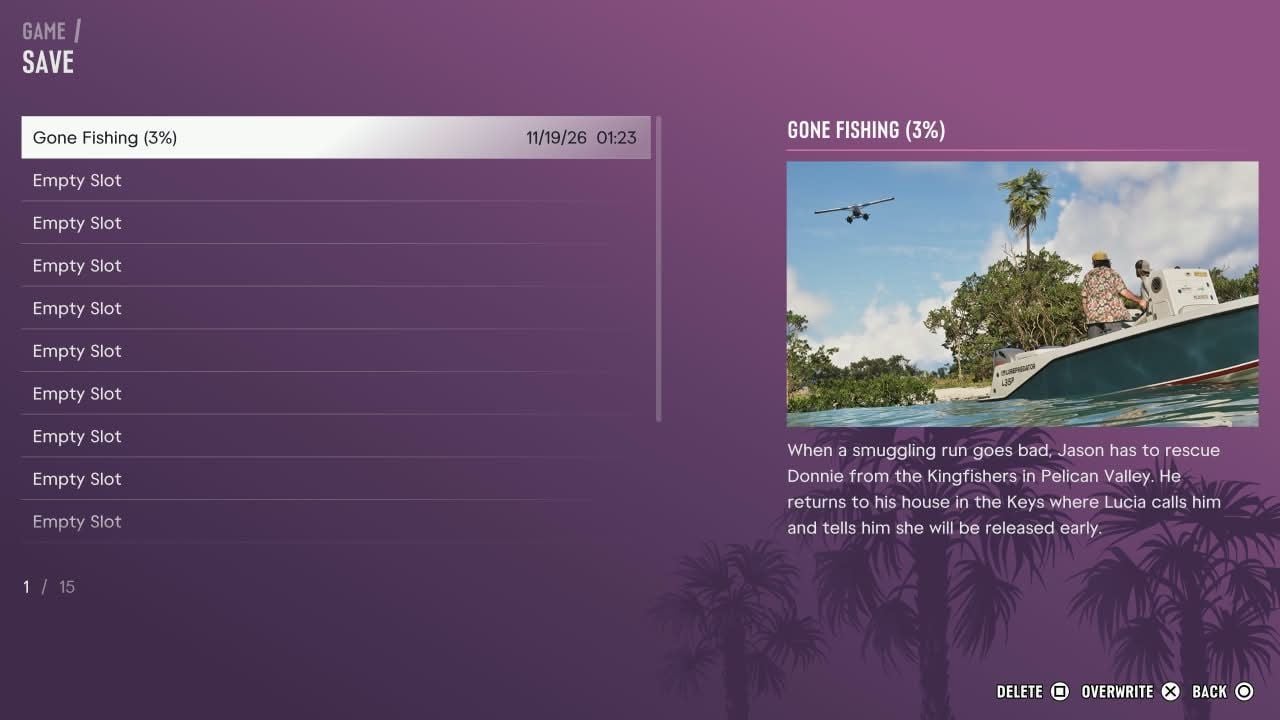
Manual saves become available after you finish the prologue and Jason arrives at his house in the Marina. From then on, the process is always the same:
- Open the pause menu outside an active mission — the Options button on PS5 or Menu on Xbox.
- Select Game and open the submenu, which gathers Save Game, Load Game and New Game.
- Choose Save Game and wait for the slot list.
- Pick an empty slot, or an old save you are willing to replace, and confirm.
- Return to the game. The file now appears in Load Game with its date, time and completion percentage.
There are 15 manual slots and a separate autosave slot. The autosave updates constantly and is there to recover recent progress, but it is not a backup: if you realize hours later that you wanted to revisit a mission, the autosave will already have moved on. Do not count on saving mid-mission either — the game does not offer that consistently during active objectives.
How to organize your 15 save slots
With 93 missions and 15 slots, the math is simple: each save covers a little over six missions on average. In percentage terms, that means creating a file every 6% or 7% of progress — the advice that appears both in Sportskeeda's guide and in IGN's analysis. The problem is that overwriting the wrong file is costly, so it pays to split the slots by role.
| Slots | Recommended use | Why |
|---|---|---|
| 1 to 5 | One permanent save at the start of each chapter | Guarantees a way back to each of the five chapters |
| 6 to 10 | Saves before key missions and decisions | Lets you test alternative paths without losing the whole chapter |
| 11 to 15 | Rotating saves for current progress | Keeps you from overwriting the permanent files during the campaign |
GTA 6's five chapters are Just Like Paradise (22 missions), Paradise Lost (13), Tits Ass Drug Money (26), Vice City, Baby (25) and Top of the World, Ma (7). Because the third is the longest, it deserves more than one mid-chapter save: one at the start, another near the halfway point and a third before the heist that closes the arc.
Missions that change the map, unlock characters or concentrate relationship decisions are the ones that most deserve a dedicated save. If you plan to explore different choices with Jason and Lucia, save right before those missions and never overwrite the file: it is your only passage back.
Things to watch when replaying chapters and missions
Going back in time in GTA 6 is not a clean replay like GTA 5's. It is a state rollback, and a few side effects deserve attention before you press Load Game:
- Later progress is discarded. Everything you did after the save — including entire chapters — has to be redone.
- There is no automatic copy of an overwritten save. If you write over a file, the previous state of that slot is gone.
- The autosave has a single slot. It moves forward with the campaign and keeps no older versions.
- Trophies and achievements stay on your account. Anything already unlocked on PlayStation or Xbox remains, but the game's internal progress returns to the save point.
- Optional activities can expire. Some side tasks are time-sensitive and stop appearing if you advance too far — replaying an old section may cost you access to them.
- Mind the spoilers. Mission titles and save descriptions reveal story twists; opening the file list can show more than you wanted to see.
There is also a structural limit. Players who finished the campaign without any earlier save cannot reopen specific missions: the post-game lets you keep exploring Leonida, but it does not unlock a replay menu. In that case the only way out is to start another campaign — which, with 50 to 100 hours of story, is quite a decision.
What changed compared to GTA 5
The comparison helps explain Rockstar's choice. In GTA 5, the replay menu was part of the normal flow: you finished the story, opened the list and replayed any mission to chase gold medals or simply watch a scene again. In GTA 6, the studio traded unrestricted replay for more open, less punishing missions.
"It's a lot harder to keep Missions as open as possible (especially in a game as large as this), but the freedom and flexibility it allows the player was worth it." — David Hynd, to Eurogamer
Without medals and without replay, the reason to redo a mission stops being the score and becomes curiosity: seeing how the story reacts to another choice, trying an alternative route or simply reliving the section. It is a model closer to Red Dead Redemption 2, where the campaign is also linear and going back depends on saves.
For anyone chasing 100% and the platinum, planning carries more weight. Because the in-game checklist and the trophies require exploration and side activities, it is worth checking the guide on how long 100% and the platinum take before deciding to replay chapters. And if the question is what to do right after a specific mission, the guide on what to do after Building a Life shows how the game chains the next objectives.
Frequently asked questions
Can you replay a mission after finishing GTA 6?
No. Completing the campaign does not unlock a replay menu. You can only go back by loading a manual save made before the mission.
Do I need a save before every mission?
Not before every one. The ideal is to save before key missions, important decisions and the start of each chapter, keeping the remaining slots for current progress.
How many saves does GTA 6 offer?
There are 15 manual slots and one autosave slot, which is overwritten automatically as the campaign advances.
Does replaying a mission erase my trophies?
No. Trophies and achievements already unlocked stay on your account. What rolls back is the game's progress — missions, money, vehicles and decisions.
Is it different on PS5 and Xbox?
No. The path is the same: pause menu, Game, Save Game or Load Game. Only the button that opens the menu changes — Options on PS5 and Menu on Xbox.
Conclusion: plan your way back before you need it
GTA 6 has no replay for completed missions, and that is unlikely to change in an update: it is a design decision, not a temporary omission. What exists is a checkpoint system during missions and 15 manual saves that work as passages to the past — as long as you remember to create them.
If you are starting now, the most useful habit is simple: before every mission that feels important, open the menu, write to a rotating slot and carry on. It takes less than a minute and saves you from finishing the campaign only to discover that the only way to see a section again is to play the whole thing over. For more coverage, visit the Santuário Geek GTA hub and the launch guide. The game's official page is Rockstar Games.
With information from Sportskeeda, Eurogamer, IGN, GameSpot, Space4Games and Rockstar Games.