To unlock Employees in Carve Wood, you need to buy the Robot Lathe for 15,000 Wood Chips. The purchase automatically unlocks the Stocker and reveals the Employees button on the left side of the screen, below the Home icon. From there, new tycoon upgrades unlock more machines and the Cashier.
If you’ve made it this far chopping trees by hand, selling piece by piece, and feeling like your sawmill has become a second job, take a breath: Employees exist specifically to break that cycle. They handle the repetitive work — stocking logs, carving, and dealing with customers — while you focus on expanding your base and farming Roblox strategically.
The Carve Wood loading screen. This is where your sawmill begins — and Employees change everything. (Image via Roblox)
The core game loop is easy to understand and addictive to master: chop down trees, collect logs, carve wooden structures, and sell them to NPCs for Cash. Every cut also earns Wood Chips, the tycoon’s upgrade currency. And it’s exactly with Wood Chips that you buy the freedom to stop doing everything yourself.
How to unlock the Employees menu
The Employees system doesn’t show up right away. It’s the reward for investing in your base first. Here’s the path:
- Upgrade the sales station and the tycoon with Wood Chips. Don’t skip steps: the Robot Lathe button only appears at your base after a sequence of upgrades.
- Plant seeds in seedbeds and chop mature trees with your axe. Rarer trees yield more Wood Chips — prioritize them whenever possible.
- Buy the Robot Lathe for 15,000 Wood Chips. Right away, the Stocker joins your crew alongside the machine.
- Open the Employees button on the left side of the screen, below Home. That’s where you’ll find details about workers and equipment.
- Keep upgrading the tycoon to unlock new machines and the Cashier, who handles sales negotiations.
The logic is clear: the game first teaches you the trade the hard way, then hands you a crew. If you try to rush straight to the Robot Lathe without strengthening your base, you’ll stall halfway there — no log production, no Chips, and no Chips means no robot.
Cashier and Stocker are the two types of Employees in the game. One stocks, the other negotiates. (Image via Roblox)
What each Employee does
There are two roles with very different jobs. Understanding this division helps you avoid the most common mistake: upgrading the wrong worker at the wrong time.
Stocker: the heart of production
The Stocker arrives first and is the most important early on. He keeps the carving station and other machines stocked with logs, keeping the production line moving without you having to haul wood back and forth.
Each Stocker upgrade increases work speed and carrying capacity. In practice: fewer bottlenecks, more carved pieces per minute, and more Cash coming in while you plant the next batch of trees.
Cashier: the tireless negotiator
The Cashier comes later and handles the other end: he accepts and rejects NPC offers on displayed carvings. Without him, you have to stop what you’re doing to serve each customer. With him, the shop sells on its own.
Cashier upgrades improve his chance of closing better deals and his negotiation skill. He’s the employee who turns production volume into real profit — and he makes a huge difference once pieces start selling for more.
If you enjoy progression guides like this one, it’s also worth checking out the Games coverage here at Sanctuary, where we gather tutorials for tycoons and simulators from Roblox.
How to upgrade Employees without wasting Cash
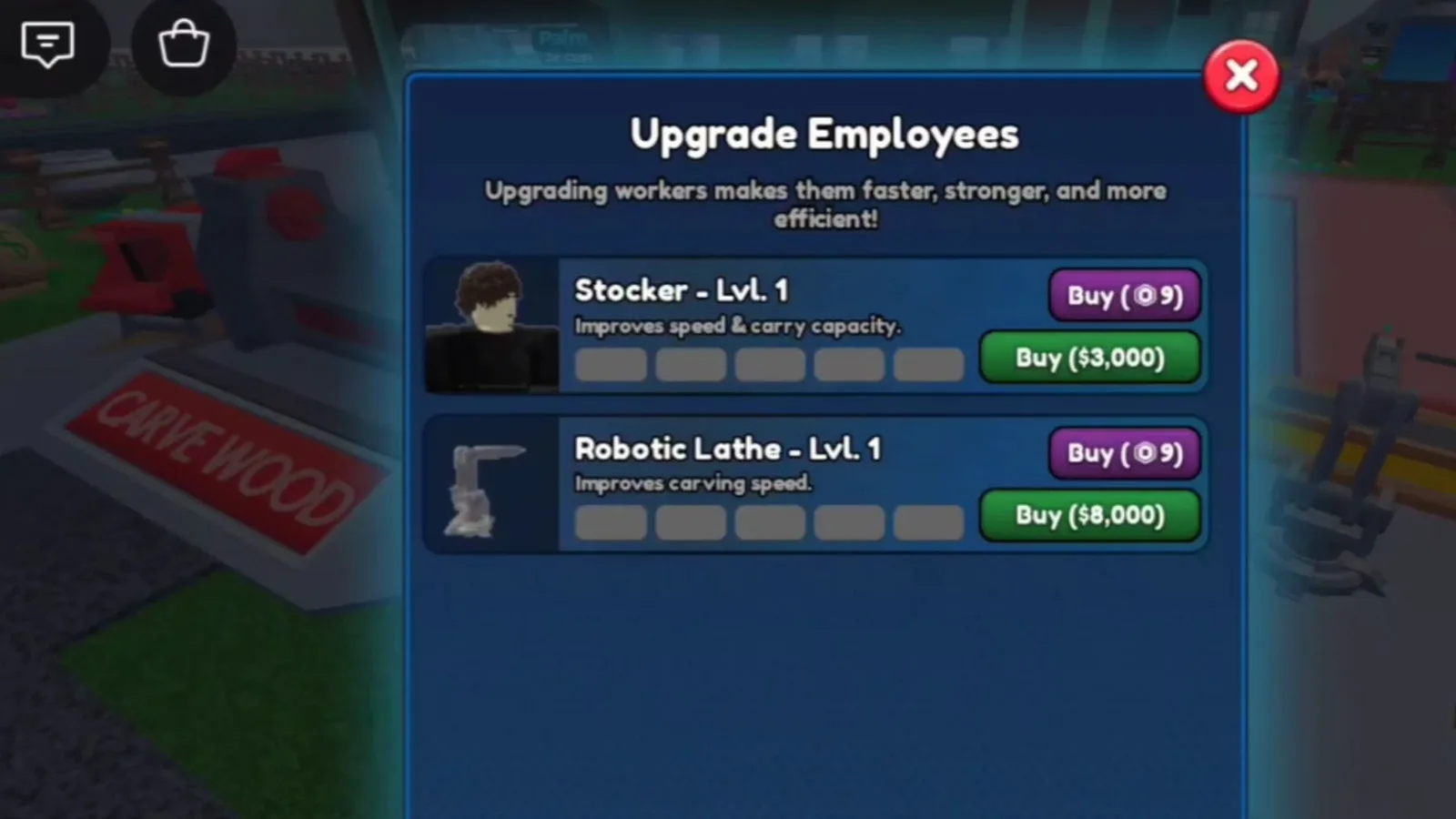
Open the Employees menu and you’ll see the game’s rule: each Employee has 10 upgrade levels. The first five are progressive and affordable; the last five cost significantly more Cash — the jump is intentional, to filter out who is actually turning a profit.
The Employees menu houses all upgrades. Level up at a steady pace: the last 5 levels cost much more. (Image via Roblox)
The strategy that works:
- First, balance the duo. An idle Stocker means idle machines; a weak Cashier means good pieces sold too cheap. Level both up in alternating fashion early on.
- Then prioritize the bottleneck. Logs piling up? Invest in the Stocker. Pieces stuck in the display? It’s Cashier time.
- Keep a reserve for levels 6 through 10. Don’t burn all your Cash on the first upgrades just because they’re cheap — the cost scales, and you’ll need breathing room.
And what about Robux upgrades — are they worth it?
Beyond Cash, the game lets you speed up upgrades with Robux. The first levels cost under 10 Robux, but once a worker becomes a Prestige Employee, the price goes over 100 Robux.
Be honest about your goal: if you play every day and want to speed up full automation, one or two early Robux upgrades unlock the flow quickly. But trying to buy all 10 levels with a card is the most expensive way to play — farming Wood Chips and Cash sustains progression just fine, and the game was designed for that. Always check prices and events on the official Roblox page before spending.
Quick tips for farming 15,000 Wood Chips
- Plant nonstop. An empty seedbed is wasted Chips. Keep the plant-chop-plant cycle running.
- Target rare trees. They take longer, but they pay out far more Chips per cut.
- Upgrade the sales station before the Robot Lathe. Selling well funds the farm — and the Lathe button only appears once your base is upgraded anyway.
- Don’t sell raw logs for no reason. Carving before selling yields more Cash, and Cash buys the upgrades that speed everything up.
Frequently asked questions
- How do I unlock the Employees menu? By buying the Robot Lathe for 15,000 Wood Chips. The button appears on the left side of the screen, below Home.
- How many levels does each Employee have? 10 upgrade levels per worker, with the last five much more expensive.
- What does the Stocker do when upgraded? Works faster and carries more logs per trip, feeding machines without pauses.
- What does the Cashier do? Accepts and rejects NPC offers automatically, with a higher chance of closing good deals on each upgrade.
- Can you upgrade with Robux? Yes. The first upgrades cost under 10 Robux; after becoming a Prestige Employee, they cost over 100 Robux.
In the end, Employees in Carve Wood are the turning point between playing lumberjack and running a real sawmill. Save up the 15,000 Wood Chips patiently, unlock the Robot Lathe, balance Stocker and Cashier — and let the machines work for you.

Related Articles
 Roblox
Complete guide to all Search for the Needle classes in Roblox with drop chances and fast farming abilities
 Roblox
The Veil Roblox Codes Reveal Dark Secrets and Grant Free Race Rerolls
Roblox
Complete guide to all Search for the Needle classes in Roblox with spin chances and fast farming abilities
 Roblox
Compartilhe suas ideias, teorias e impressões sobre esta matéria com a comunidade.