Carve Wood Roblox: How to Unlock Employees
Published on · Updated on
Complete Carve Wood Employees guide (Roblox): unlock the Robot Lathe for 15,000 Wood Chips and automate your lumber mill.
To unlock Employees in Carve Wood, you need to buy the Robot Lathe for 15,000 Wood Chips. The purchase automatically unlocks the Stocker and opens the Employees button on the left side of the screen, below the Home icon. From there, further tycoon upgrades unlock more machines and the Cashier.
If you got this far chopping trees by hand, selling piece by piece and feeling like the lumber mill became a second job, take a breath: Employees exist precisely to break that cycle. They take over the repetitive work — stocking logs, carving and dealing with customers — while you focus on expanding your base and farming Roblox with strategy.
Carve Wood loading screen. This is where your lumber mill begins — and Employees change everything. (Image via Roblox)
The basic game loop is simple to understand and addictive to master: chop down trees, collect logs, carve wooden structures and sell them to NPCs for Cash. Each cut also earns Wood Chips, the tycoon's evolution currency. And it is exactly with Wood Chips that you buy the freedom to stop doing everything on your own.
How to unlock the Employees menu
The Employees system does not show up right away. It is the reward for players who invested in the base first. The path is this:
- Upgrade the selling station and the tycoon with Wood Chips. Do not skip steps: the Robot Lathe button only appears at your base after a sequence of upgrades.
- Plant seeds in the seedbeds and chop adult trees with the axe. Rarer trees yield more Wood Chips — prioritize them whenever possible.
- Buy the Robot Lathe for 15,000 Wood Chips. Right away, the Stocker joins the crew along with the machine.
- Open the Employees button, on the left side of the screen, below Home. That is where the worker and equipment details live.
- Keep upgrading the tycoon to unlock new machines and the Cashier, who handles negotiations.
The logic is clear: the game first teaches you the trade the hard way, then hands you a crew. Players who rush straight to the Robot Lathe without strengthening the base get stuck halfway — with no log production, there are no Chips, and with no Chips, there is no robot.
Cashier and Stocker are the two types of Employees in the game. One supplies, the other negotiates. (Image via Roblox)
What each Employee does
There are two roles, with very different functions. Understanding this split avoids the most common mistake: upgrading the wrong worker at the wrong time.
Stocker: the heart of production
The Stocker is the first to arrive and the most important early on. He feeds logs into the carving station and the other machines, keeping the production line running without you having to carry wood back and forth.
Each Stocker upgrade increases work speed and carrying capacity. In practice: fewer bottlenecks, more carved pieces per minute, more Cash coming in while you plant the next batch of trees.
Cashier: the tireless negotiator
The Cashier comes later and handles the other end: he accepts and rejects NPC offers on displayed carvings. Without him, you have to stop what you are doing to serve each customer. With him, the shop sells on its own.
Cashier upgrades improve the chance of closing better deals and negotiation skill. He is the employee who turns production volume into real profit — and he makes a huge difference once pieces start being worth more.
If you enjoy progression guides like this one, it is also worth exploring the Games coverage here at the Santuário, where we gather tycoon and simulator tutorials for Roblox.
How to upgrade Employees without wasting Cash
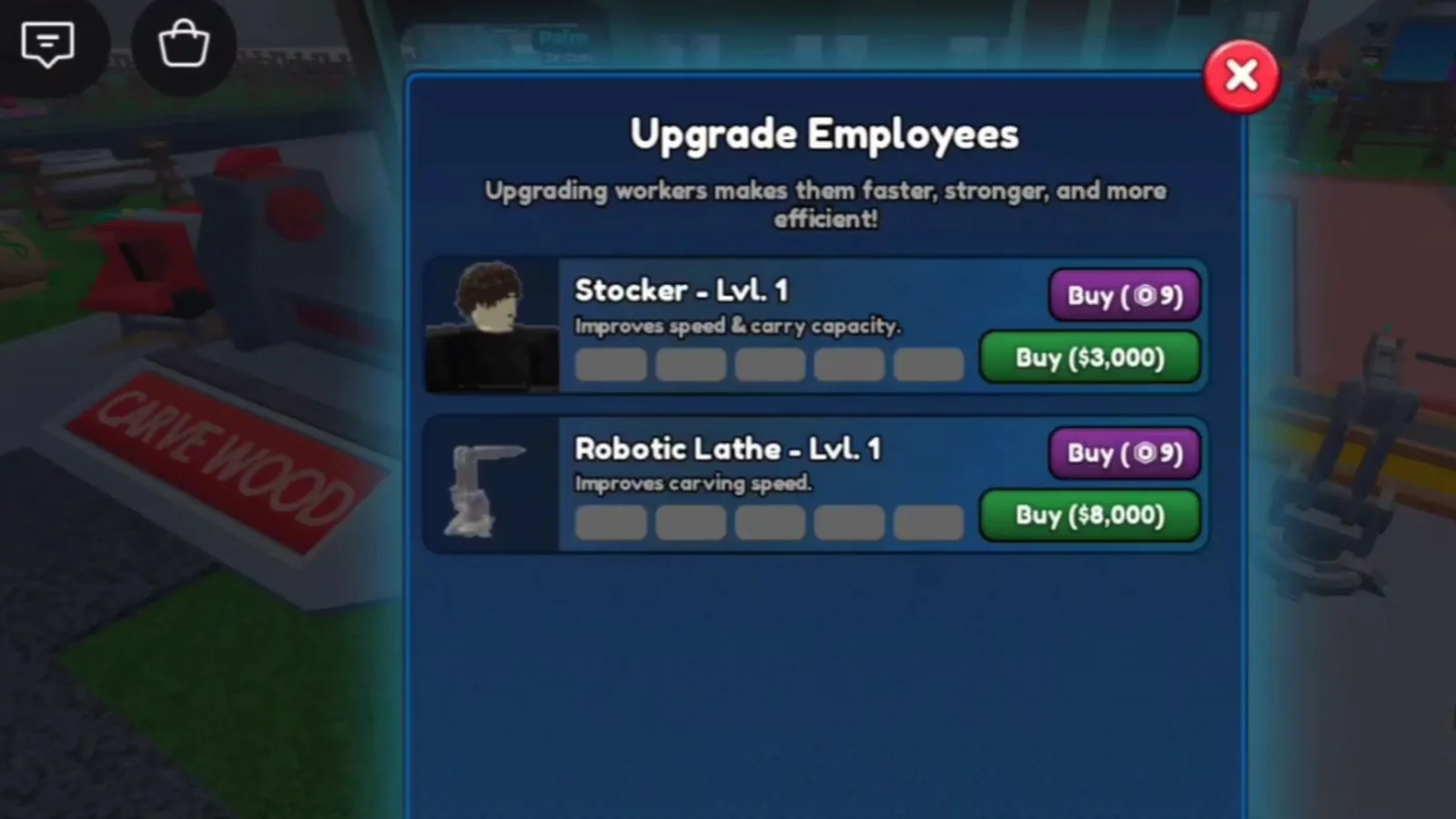
Open the Employees menu and you will see the rule of the game: each Employee has 10 upgrade levels. The first five have a progressive, affordable price; the last five cost much more Cash — the jump is intentional, to filter out players who are not really profiting yet.
The Employees menu gathers all upgrades. Upgrade calmly: the last 5 levels cost much more. (Image via Roblox)
The strategy that works:
- First, balance the pair. An idle Stocker means idle machines; a weak Cashier means a good piece sold cheap. Level both alternately at first.
- Then, prioritize the bottleneck. A pile of logs building up? Invest in the Stocker. A piece stuck in the display case? Time for the Cashier.
- Keep a reserve for levels 6 to 10. Do not burn all your Cash on the early upgrades just because they are cheap — costs scale up and you will need stamina.
And the Robux upgrades, are they worth it?
Besides Cash, the game lets you speed up upgrades with Robux. The first levels cost under 10 Robux, but after the worker becomes a Prestige Employee, the price goes over 100 Robux.
Be honest about your goal: if you play every day and want to fast-track full automation, one or two early Robux upgrades unlock the flow quickly. But trying to buy all 10 levels with your card is the most expensive way to play — farming Wood Chips and Cash sustains progression just fine, and the game was designed for that. Always check prices and events on the Roblox official page before spending.
Quick tips for farming the 15,000 Wood Chips
- Plant nonstop. An empty seedbed is Chips lost. Keep the plant-chop-plant cycle running.
- Go for rare trees. They take longer, but they pay far more Chips per cut.
- Upgrade the selling station before the Robot Lathe. Selling well funds the farm — and the Lathe button only shows up with an upgraded base anyway.
- Do not sell raw logs carelessly. Carving before selling earns more Cash, and Cash buys the upgrades that speed everything up.
Frequently asked questions
- How do I unlock the Employees menu? By buying the Robot Lathe for 15,000 Wood Chips. The button appears on the left side of the screen, below Home.
- How many levels does each Employee have? 10 upgrade levels per worker, with the last five much more expensive.
- What does the Stocker do when upgraded? He works faster and carries more logs at a time, feeding the machines without pause.
- What does the Cashier do? He automatically accepts and rejects NPC offers, with a higher chance of closing good deals with each upgrade.
- Can I upgrade with Robux? Yes. The first upgrades cost under 10 Robux; after becoming a Prestige Employee, they go over 100 Robux.
In the end, Employees in Carve Wood are the dividing line between playing lumberjack and running a real lumber mill. Gather the 15,000 Wood Chips patiently, unlock the Robot Lathe, balance Stocker and Cashier — and let the machines work for you.
Suggested and related articles

Complete Sell Ores Gears Guide Reveals How to Multiply Profits and Speed Up Mining to the Max

Complete guide to all Search for the Needle classes in Roblox with spin odds and abilities to farm fast

Crazy Diver: a beginner's guide to Roblox

+1 Venom Evolution: how the Evolve system works in Roblox

Climb For Animals Eggs: farm Speed fast in Roblox